
FollowMyHealth®
Veradigm LLCMedical
4.775.04K Reviews
- Version
- 2026.10.21
- Installs
- 5.00M
- Age Rating
- Everyone
Screenshots
Our Review of FollowMyHealth®
 Analysis by Appyee
I find a healthcare app most useful when it reduces the small bits of friction around care: checking what happened at a visit, finding a result later, or keeping a question from getting lost in text messages. FollowMyHealth® is built around that practical role, bringing health information and contact with a provider into a single place. It is a free medical app from Veradigm LLC, and its broad appeal is reflected in a 4.8 average from around 186,000 ratings, with more than five million installs.
What the app is best suited to
The key thing to understand is that FollowMyHealth is a portal, not a replacement for a clinic’s care team. Its usefulness depends on whether your provider supports it and connects your records. When that connection is in place, the app can make routine follow-up easier; when it is not, the experience may be much less complete. I would check with the clinic you actually use before making it the center of your health routine.
That provider connection also shapes what you can do. A patient portal can put records, appointments, and secure conversations within reach, but it does not mean every office offers every function or updates everything at the same pace. I would treat the app as a convenient window into participating care, rather than a universal record that automatically includes every doctor, hospital, or test.
A useful role between appointments
For someone managing several ongoing appointments, the main advantage is having fewer places to search. You can use the app to review information your care team has made available, keep track of plans, and prepare questions before the next visit. That is a more grounded benefit than expecting an app to interpret results or make decisions on your behalf.
A realistic example is a patient who has a follow-up coming up and wants to remember what changed after the previous visit. Checking the available record beforehand can help them arrive with a clearer timeline and specific questions. I would still bring urgent symptoms directly to a qualified clinician; a portal message is for ordinary communication, not emergency care.
Where expectations need to stay realistic
There is a trade-off with any provider-linked portal: convenience comes from the connection, but that can also make the app feel uneven from one person to another. If your clinic does not support it, or if the information you need is not shared through the portal, installing the app alone will not solve that gap. Someone who only needs a single provider’s records may find that provider’s own portal simpler, while a person seeking a personal health organizer may prefer a tool designed around manually collecting information from many sources.
I also would not choose a patient portal as my only way to keep essential medical details. Access to an account can depend on being able to sign in, and a phone is not always available when you need it. For important medication or allergy information, I would keep a reliable backup that I can access offline and confirm changes with the care team.
Who should consider it
FollowMyHealth is a sensible option if your provider uses it and you want a practical way to stay involved between visits. It may be especially handy for people who regularly check results, manage follow-ups, or prefer to send routine questions through a dedicated channel rather than calling during office hours. The app is rated for Everyone, but that does not mean every patient will find it equally useful: the provider’s setup and the person’s comfort with digital health tools matter more.
If you prefer paper records, rarely use a smartphone, or expect one app to combine every provider automatically, this may not be the right fit. I would also avoid relying on it to diagnose a problem or replace a conversation with a clinician. Its value is organizational and communicative, not a substitute for professional medical judgment.
Getting Started with FollowMyHealth®
First things first, downloading and setting up FollowMyHealth® was a breeze. Available on both Android and iOS, you can easily grab it from the Play Store or App Store. Once installed, I was greeted with a clean and intuitive interface that made navigation a piece of cake.
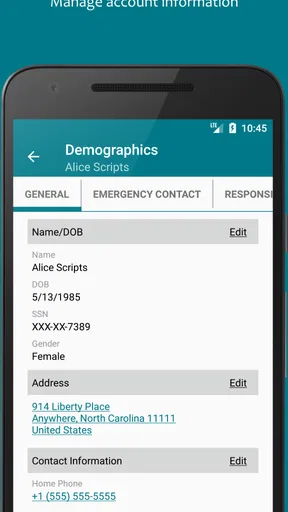
Registering required a few basic details, and if your healthcare provider supports the app, you can link your records with just a couple of taps. If not, no worries! You can manually enter your information, which is super handy if you’re trying to keep track of everything in one place.
Features That Stand Out
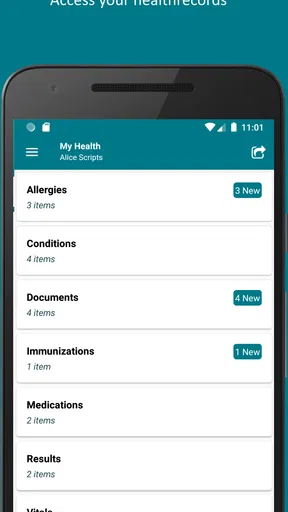
What really caught my attention were the plethora of features FollowMyHealth® offers. From viewing your medical records to scheduling appointments, this app does it all. Let’s dive into some of its standout features:
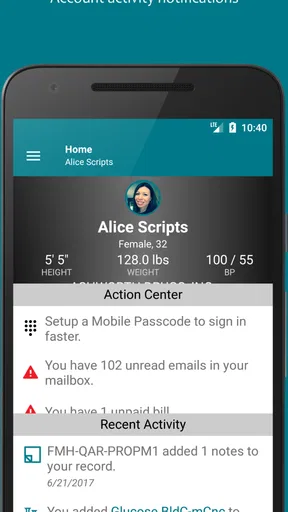
- Health Records Access: You can view your lab results, medications, and even medical history. It’s like having a mini medical file on hand 24/7.
- Appointment Management: Need to see a doctor? Schedule and manage your appointments right from the app. It even sends you reminders so you never miss a visit.
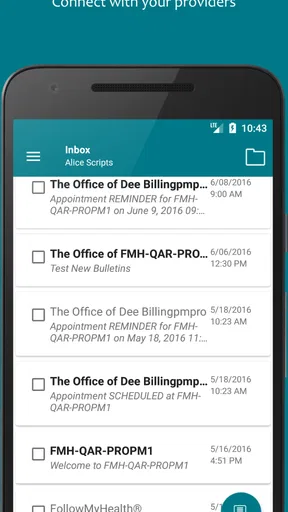
- Secure Messaging: Got a question for your doc? Send them a message through the app. It’s secure and keeps all your communications in one place.
- Health Tracking: Track your vitals, exercise, diet, and more. It’s a great way to stay on top of your health goals.
Having these features at my fingertips made managing my health feel less like a chore and more like second nature.
Using the App Day-to-Day
After a couple of weeks of using FollowMyHealth®, it became a regular part of my daily routine. I found myself checking my health stats in the morning, sending quick messages to my healthcare provider, and even reminding myself of upcoming appointments. The app seamlessly integrated into my lifestyle, making it an invaluable tool.
The integration with wearable devices is also a nice touch. If you’re a fitness enthusiast like me, you’ll appreciate how effortlessly it syncs with your fitness tracker to keep all your health data in one spot. There's something so satisfying about seeing all your health metrics in one glance.
Privacy and Security
Now, I know what you’re thinking: is it safe? Absolutely! FollowMyHealth® takes privacy seriously, using top-notch encryption to ensure your data is secure. They comply with all the relevant health data regulations, so you can rest easy knowing your information is in good hands.
Having this level of security really puts my mind at ease, especially when dealing with something as sensitive as health information.
Version, continuity, and what I would check
The app was released on August 6, 2012, and its current version is 25.7. That long history suggests a product that has continued to be maintained, but a version number by itself does not tell me which screens or workflows changed, or whether a particular provider has adopted them. I would separate that visible evidence of ongoing versioning from assumptions about what has improved: the practical test is still whether the functions your clinic offers work well for your account.
For existing users, a sensible approach is to keep the app current on a supported device and periodically confirm that the connected provider and records are still the ones you intend to use. If an appointment, result, or message is important, check that it appears in the portal rather than assuming that a feature mentioned generally is available through every clinic. Small checks like these prevent a patient portal from becoming a source of misplaced confidence.
Before depending on a new portal, I would also think through account access. Make sure you can complete sign-in, know how to recover access, and understand which family member’s records are being viewed if more than one person uses the same device. Those are ordinary setup habits, but they matter when the information is personal and the app is used during a busy appointment day.
Practical ways to get more from it
One useful habit is to open the app before—not during—the visit and jot down the questions you want to ask. A message thread or available record can help you refer to the same issue later, but it is still worth stating the date, symptom, or medication you mean clearly. That makes a routine exchange easier to follow and reduces the chance that a short note is misunderstood.
Another good use is checking records after a visit and comparing what you see with the instructions you were given. If something looks incomplete or confusing, ask the provider to clarify it instead of trying to infer a diagnosis from a result label. This is where a portal is strongest: it can help you notice what needs follow-up and keep the conversation organized, while the clinician supplies the interpretation.
For people coordinating care for a relative, the app may help keep information close at hand, but I would first confirm whose account is being used and what access the provider allows. I would not assume that signing in on one phone automatically gives appropriate access to another person’s records. Keeping accounts and devices clearly separated is a simple privacy-minded choice.
Compared with calling an office, a portal can be more convenient for a non-urgent question because the conversation stays tied to the account rather than being scattered across notes or voicemail. Compared with a general health journal, it has the advantage of showing information the provider makes available, but it is less useful as a personal archive when your care comes from organizations that do not connect to it. The right choice depends on whether your priority is provider communication or collecting your own information across many sources.
Final Thoughts
All in all, FollowMyHealth® has been a game-changer for me. It’s like having a personal assistant dedicated to my health needs. Whether you’re a tech-savvy individual or someone who just wants to keep everything organized, this app is worth checking out. It’s convenient, comprehensive, and most importantly, it makes managing your health feel effortless.
If you’re looking for a way to streamline your health management, give FollowMyHealth® a try. It might just become your new favorite app!
I would make that recommendation with one practical condition: start with the provider you rely on, not with an assumption that the app will gather every part of your medical life. If that provider’s portal fits your routine, the free price makes it easy to try without adding a subscription decision, and the app’s everyday value is in keeping care details and ordinary follow-up within reach.
My overall view is positive but specific. FollowMyHealth can make the administrative side of care feel less scattered when its provider connection is useful to you; it is not a universal medical file, an urgent-care channel, or a source of diagnosis. If you go in with those boundaries in mind, you can judge its usefulness by whether it makes your next appointment and follow-up easier, rather than by how many features you expect any one health app to cover.
Privacy and Permissions
See what permissions an app requests and how it handles your data.
- Location
- approximate location (network-based), precise location (GPS and network-based)
- Photos/Media/Files
- read the contents of your USB storage, modify or delete the contents of your USB storage
- Storage
- read the contents of your USB storage, modify or delete the contents of your USB storage
- Camera
- take pictures and videos
- Microphone
- record audio
- Other
- view network connections, pair with Bluetooth devices, full network access, change your audio settings, prevent device from sleeping
Verdict
Strengths of FollowMyHealth®
- User-friendly interface for easy navigation.
- Comprehensive health record access anytime.
- Secure messaging with healthcare providers.
- Appointment scheduling directly through app.
- Integration with wearable health devices.
Limitations of FollowMyHealth®
- Limited customization of health data views.
- Occasional syncing issues with provider systems.
- Some features require provider participation.
- Notifications can be overwhelming at times.
- Limited offline functionality for data access.
Similar Picks in This Category
View All
WebMD: Symptom Checker
WebMD, LLC4.1

Microphone Amplifier
DOSA Apps4.2

Anatomy Learning - 3D Anatomy
3D Medical OU4.5

Period Tracker and Calendar
SimpleInnovation4.9

GoodRx: Prescription Coupons
GoodRx4.8

CVS Health
CVS Pharmacy4.5
Frequently Asked Questions
What is FollowMyHealth® and how does it work?
FollowMyHealth® is a comprehensive health management app that allows users to access their medical records, schedule appointments, and communicate with healthcare providers. By integrating with various healthcare systems, it provides a centralized platform for managing health information, making it easier for users to stay informed about their health status and history.
Is my personal health information safe with FollowMyHealth®?
Yes, FollowMyHealth® prioritizes user privacy and employs advanced security measures to protect personal health information. The app uses encryption and secure login methods to ensure that your data is safe and accessible only to authorized users. It's crucial to use strong passwords and enable additional security features for enhanced protection.
Can I access FollowMyHealth® on multiple devices?
Absolutely, FollowMyHealth® is designed to be accessible across multiple devices, including smartphones, tablets, and computers. The app is available for both Android and iOS, and users can also log in through a web browser. This cross-platform functionality ensures that you can manage your health data anytime, anywhere.
What features does FollowMyHealth® offer to improve healthcare management?
FollowMyHealth® offers a variety of features including appointment scheduling, prescription management, lab result viewing, and direct messaging with healthcare providers. These tools are designed to streamline the healthcare process, allowing users to efficiently manage their health and communicate effectively with their care team.
How do I troubleshoot common issues with the FollowMyHealth® app?
If you encounter issues with FollowMyHealth®, start by checking your internet connection and ensuring the app is updated to the latest version. For login problems, verify your credentials and consider resetting your password. The app also provides a help section with troubleshooting tips, or you can contact their support team for assistance.
